

CareerFoundry: A Course on User-Centricity in UX Design
Estimated Reading Time: 11 Minutes
By: Jon Lee
Share


KEY
POINTS
- User-centricity in UX design is about putting the user’s needs, behaviors, and preferences first. This leads to a more useable website and one that’s more intuitive when it comes to interactivity.
- User-centricity helps bolster user satisfaction, boost conversion rates, and can even help reinforce user loyalty. But it goes beyond just anticipating your users—user-centricity also involves implementing user feedback to further improve the website over time.
- By incorporating a proactive user feedback loop, you can quickly implement fixes and avoid large and costly updates.
User-centricity is at the heart of CareerFoundry’s engaging and well-organized site. The web design is incredibly focused on engaging the user and making it easy for their expected audience to get the information they need about their offerings and potentially lead to conversion.
But before we get into the meat of the website and its user-centricity, let’s review what user-centricity means in the UX design space.
What is User-Centricity in UX Design?
User-centricity in UX design is the concept of placing the user’s needs, desires, and behaviors at the highest level of the design process. User-centricity focuses on designing with compassion towards the user, understanding what users are trying to achieve with a product, providing the means to efficiently complete those tasks, and prioritizing the user’s experience above all else.
By following the philosophy of good user-centricity, you can create a website that anticipates and accommodates your users and brings them back time and time again.
Why Is User-Centricity Important?
User-centricity is important in UX design because of how it improves both the user’s experience on your webpage as well as your business outcomes. User-centricity is an important way to build a loyal base of satisfied users, building your brand, and it can even help keep your development costs down.
User-centricity is also important for businesses with websites, especially if the business has a lot of competition. For example, in the world of competing airlines, users are more likely to use an airline website to order their tickets if the site follows the principles of user-centricity.
How Is User-Centricity Implemented?
User-centricity drives the implementation of features such as intuitive interfaces and easy navigation. User-centricity also guides the integration of accessible design elements, which guarantee that all users have equal opportunities to engage with the site’s functionalities. This ultimately ensures that all users can efficiently access and use any information on a website.
When assessing user-centricity on the CareerFoundry site, it was found to have a focused application of three core UX design principles: simplicity, accessibility, and interactivity.
How Does User-Centricity Emphasize Simplicity?
User-centricity emphasizes simplicity by creating an interface or layout that is easy to navigate, accessible, clearly communicates information and navigation tools, and maintains consistency.
By focusing on user-centricity, users can enjoy a simpler process to reach their goals. This user-centric process requires intuitive interfaces and clear information that helps users efficiently complete tasks and digest information more easily.
How Does User-Centricity Contribute to Accessibility?
User-centricity can contribute to accessibility with the use of well-contrasted elements, easy-to-read text, and even the integration of audio description services.
By emphasizing user-centricity in your webpage, you can incorporate design elements that accommodate as many individuals as possible, even if they have visual or audio impairments, or even mobility issues.
How Does User-Centricity Affect Interactivity?
User-centricity positively affects interactivity when the web designers aim to enhance the responsiveness of the website to the user’s inputs. This also enhances the level of engagement when a user interacts with a certain element such as a button, a menu, or an embedded video.
What is User-Centricity’s Most Common Challenges?
User-centricity’s most common challenges often involve the very tasks that help web designers achieve truly good user-centric design.
- Researching and understanding the diverse needs of users and users with disabilities.
- Improving accessibility and implementing inclusive design while not compromising on aesthetic quality and functionality.
- Gathering user feedback for future improvements.
- Balancing user needs with business objectives.
- Researching new, evolving user expectations.
As an ever-evolving practice and design philosophy, user-centricity faces challenges all the time. But creative, user-centric web designers are always finding ways to overcome those obstacles, and the result is a highly competitive webpage!
How Does User-Centricity Influence UX?
User-centricity has a great influence on UX design, especially for websites that rely on user traffic for business success. For many businesses that exist in the same industry and need a means of differentiating themselves, user-centricity can be key to making your website stand out.
Keeping up with user-centricity on your website can help create a loyal user base that keeps growing. This in turn can drive UX designs to integrate more user-friendly elements. But to maintain this kind of cycle, it will require being proactive in seeking user feedback to guide future changes and remain in favor with user sentiment.
Today, user-centricity continues to affect the world of UX design. Many web designers today continue balancing the aesthetic wants of their clients and employers while still trying to offer users a smooth and efficient experience using a highly functional interface.
What is CareerFoundry?
CareerFoundry is an online provider of educational programs for individuals looking to either make a career change or simply grow in skills such as UX Design and UI Design.
They also offer their students and graduates access to different events related to the fields they teach, and there is a blog section containing content related to their course topics. This provides users with a wealth of information, but CareerFoundry makes them easy to find and access.
Being a provider of coursework in subjects such as UX Design, it makes sense that CareerFoundry would know how to implement elements of user-centricity such as simplicity, accessibility, and interactivity.
Examples of User-Centricity in CareerFoundry
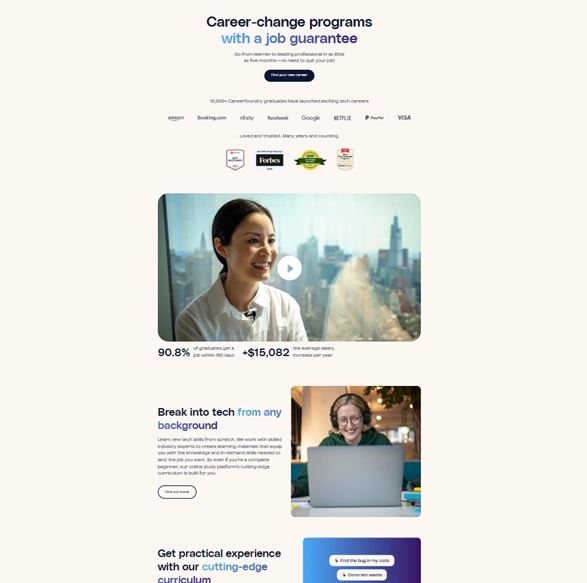
Upon entering the CareerFoundry site, visitors are introduced to a clean layout that neatly presents several important elements of user-centricity.
The Offering Statement
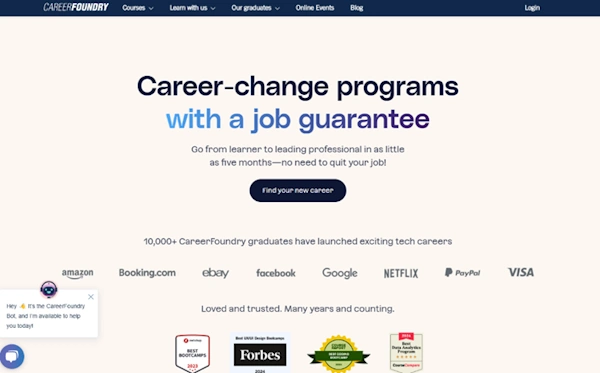
The offering statement greets all visitors in big, bold words stating what CareerFoundry has to offer to YOU.
The offering statement utilizes well-contrasted font, which makes good use of the white space and utilizes special font effects to help draw the user’s eye to one of the main benefits that CareerFoundry offers. This meets a combination of UX accessibility and effective communication techniques, both of which contribute towards user-centricity.
The Header Nav
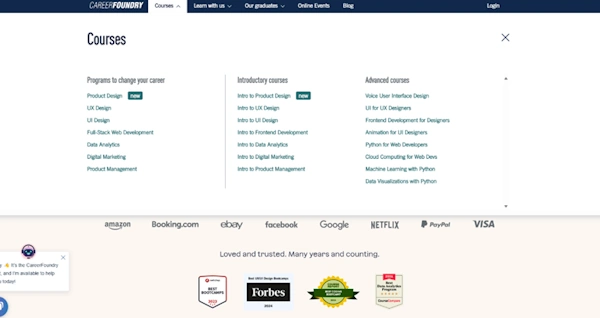
The header nav is focused and well-organized, offering you quick pathways to what they know is important to their customer base:
- What courses are offered.
- Why you should enroll and learn with them.
- How they’ve helped others who’ve enrolled and graduated.
- Events where CareerFoundry offers its expertise and engages with the community.
- A blog where plenty of relevant information should be available.
The header nav too addresses the needs for user-centricity, offering accessibility and providing clear and intuitive means of navigation.
Well-Contrasted Buttons
A well-contrasted “Find your new career” button is located beneath the offering statement that transports you further down the main page to their list of program cards. Well-contrasted buttons are also in each program’s card that take the user to more in-depth information.
Using proper contrast makes for easier readability—an important part of accessibility, which naturally contributes to user-centricity.
The use and placement of these buttons also demonstrates CareerFoundry’s understanding of their user personas. They know well their audience, where a user’s attention should be, and how to quickly guide each prospective student to what they’re looking for: learning about programs in their field of interest.
Building Trust and Credibility
Building trust and credibility can be done with an array of awards and graduate placement locations that quickly inform the user of CareerFoundry’s accomplishments as a company and a quiet testimonial of how other visitors have benefited from their services.
Building trust this way helps meet the objectives of user-centricity by enhancing user engagement, quickly building trust and credibility even before the user begins exploring, and supporting user decision-making since they are likely anticipating a visitor to be a prospective student.
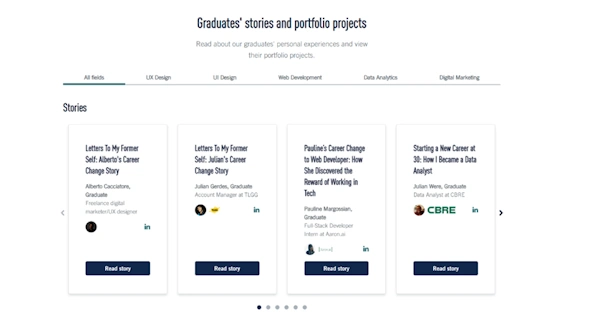
Further down the main webpage, there is also a section with graduate testimonials and a “More Stories” button that takes you to a page containing some further testimonials and case studies.

Other Elements of the Site
As you scroll down the main webpage, similar design choices can be seen with an emphasis on clear messaging, effective use of white space with properly contrasted font and images, clear statistics of their graduates and their success rate at finding a job within a certain span of time, utilization of font effects to draw the visitor’s attention (while still maintaining proper contrast), and even an FAQ.
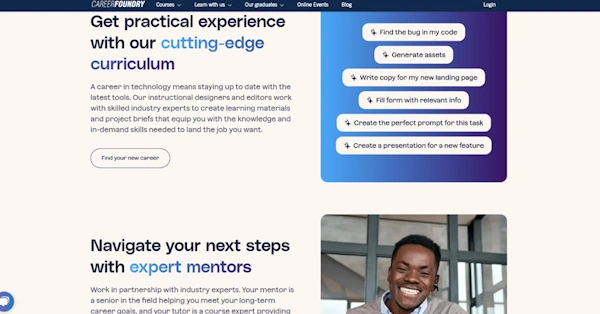
It’s handy to note that the header nav continues to follow you, allowing you quick access to parts of the site without having to scroll all the way to the top. There is also a chatbot feature, offering users another way of getting information and helps boost the page’s user-centric UX design when it comes to useability, accessibility, and engagement.
An Example That Lacks User-Centricity
If a webpage lacks user-centricity, it can make that webpage suffer from user frustration, poor accessibility, and increased bounce rates.
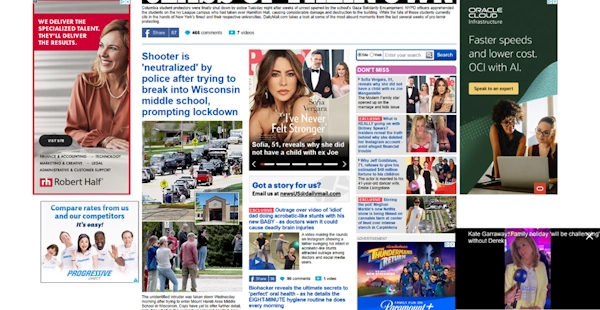
For this example, upon visiting the main page, visitors are immediately bombarded by ads and dense clusters of articles with font that can be too small. The overcrowding of elements, the tiny hard-to-read font, and number of distracting ads can quickly become an annoyance for any user, but it can also cause accessibility problems for users with poor vision.
Example of User-Centricity in Applications
A good example of user-centricity in applications is the payment platform Stripe. Much like the focus of our article, CareerFoundry, Stripe achieves user-centricity through the use of the same three UX principles: simplicity, accessibility, and interactivity.
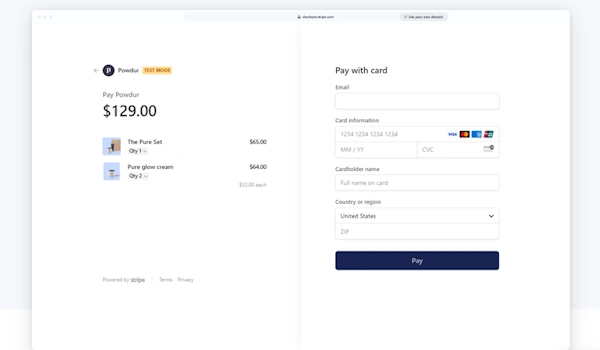
To ensure better accessibility, each part of the platform’s interface is easy to read, contrasted well against a white background. The use of images such as for items to be purchased, the payment card type and CVC number help guide users to find the right information they need to make a payment.
Interactivity is enhanced with the ability to adjust the quantity of items while remaining on the payment screen. The secondary text beneath the item that’s being ordered twice further assists the user in knowing how much they’re ordering and explains the price.
Simplicity is emphasized in the omission of excessive information and any distracting visual elements. Stripe knows what their users want to do with their platform, and they remain focused on getting the user to their end goal of knowing what they owe, entering their payment information, and making a secure payment.
Putting Your Users First Makes Them Think of You First!
To get users and visitors to think of you first, you’ll need to ensure that your webpage is designed to put them first!
But it takes more than just telling your users and visitors “We put you first”. You must show it by making sure that your web design has the right elements that take your users, their goals, and their expectations into account and prioritizes them. Those elements then need to help the users accomplish their goals as smoothly, efficiently, and pleasantly as possible.
Whether it’s accessibility, simplicity, or interactivity, addressing each of these brings your users closer to becoming conversions and repeat visitors.
If you’d like to ensure that your webpages are tailored to ease your users towards higher conversion and greater retention, find all your web design specialists right here with the team at Cleveland Web Works!
Revisit A Section
- What is User-Centricity in UX Design?
- Why Is User-Centricity Important?
- How Is User-Centricity Implemented?
- How Does User-Centricity Emphasize Simplicity?
- How Does User-Centricity Contribute to Accessibility?
- How Does User-Centricity Affect Interactivity?
- What is User-Centricity’s Most Common Challenges?
- How Does User-Centricity Influence UX?
- What is CareerFoundry?
- Examples of User-Centricity in CareerFoundry
- The Offering Statement
- The Header Nav
- Well-Contrasted Buttons
- Building Trust and Credibility
- Other Elements of the Site
- An Example That Lacks User-Centricity
- Example of User-Centricity in Applications
- Putting Your Users First Makes Them Think of You First!
