

Imagery in UX Design: How Arhaus Uses It Well
Estimated Reading Time: 16 Minutes
By: Jon Lee
Share


KEY
POINTS
- Imagery is about creating visual appeal, but also about conveying information in a way more efficient than text alone can.
- Imagery plays a key role in establishing brand identity and making a brand memorable.
- Imagery in UX also serves to enhance the user experience, making webpages and applications easier to navigate.
Imagery in UX design is about enhancing the user experience by strategically using a multitude of visual elements like icons, illustrations, hero images, photos, graphs, and animations. UX designers are tasked with choosing the right kinds of imagery to meet a website or application’s overall design goals. Imagery in UX comes in many forms and serves multiple functions and can have major impact on a user’s perception of a webpage, an application, and even a brand entity.
What is Imagery in UX Design?
Imagery is an important key element in UX design. Imagery has a direct impact on user perception and user behavior. With effective imagery, a website or application can also aid a user in becoming more invested in a brand and their products.

What is the Role of Imagery in UX Design?
The role of imagery in UX design is a multifaceted one that can change how users behave on a website or application interface and how those users feel as they experience the rest of the site or application. Without imagery, websites and applications would be less engaging and it can take more effort to educate users on certain concepts with just text. Imagery, on the other hand, can quickly explain certain concepts and ideas.
If done improperly, the wrong imagery can be confusing, create accessibility problems, or even offend users. But when properly selected and integrated, imagery in UX can result in better usability, higher user engagement, and even help establish an emotional connection between users and a brand.
Why is Imagery Important for Enhancing User Experiences?
Imagery is important for enhancing user experiences because it does much more than simply complement textual information. Imagery also plays a role in enhancing user navigation, establishing visual hierarchy, making engaging interactive elements, and even helps with optimizing load times.
- Imagery such as icons can help provide visual cues for users to not just take certain actions but also to easily navigate a website or application. When effectively used, icons and symbols can enhance the user experience, lower the user learning curve, and reduce cognitive load.
- Imagery in UX establishes visual hierarchy by how it draws user attention to the most important elements of a webpage or an application’s interface. With imagery to help, users can be more effectively guided through their intended journey, better ensuring that they reach the proper next steps, complete their tasks, and accomplish any end goals.
- Imagery makes interactive elements more engaging with attention-grabbing icons, symbols, and animations. Imagery can intuitively suggest to users that an element is interactive. Imagery can also be used as a feedback mechanism, such as a color change or a button animation when a user clicks or touches a button on the screen.
- When imagery is properly optimized, it leads to faster loading of those visual elements and lowers user frustration that would be caused by waiting.

How Has the Use of Imagery in UX Evolved Over Time?
The use of imagery in UX has evolved over time thanks to numerous technological developments, evolving user expectations, and changes to design trends.
The Early Days
During the earlier days of web design, imagery was limited and used minimally because of slower internet speeds. The addition of imagery further slowed the load times of webpages. Also, the quality of imagery was at most basic and didn’t add much to visual appeal.
The 90’s
In the late 90’s, imagery saw the emergence of flash animation to offer a more engaging web experience. While flash animation allowed for greater possibilities in imagery, the internet was still too slow to take full advantage of flash animation and high-quality images.
The Web 2.0 Era
Imagery in UX saw a true rise during the Web 2.0 era. With both higher internet speeds and the use of social media platforms, the importance and impact of imagery became significantly greater.
The Rise of Mobile Devices
Imagery saw a greater demand for image optimization and mobile responsiveness as mobile devices become more popular.
Advancements in Display Technologies
As desktops, smartphones, and other mobile devices became more advanced, imagery saw the emergence of incredibly high resolutions and display screen technology such as Apple’s Retina Display.
A New Personalized Emphasis on User-Centric Design
Imagery evolves along with user-centric design. Customized visuals are implemented to provide users with a more personalized user experience, taking into account a user’s preferences and behaviors. With the increased use of contextual imagery, visuals improve usability and now play a more direct role in helping users complete their tasks.
Modern Technologies and Ethical Considerations
Now, imagery has evolved with the help of new technologies such as augmented reality (AR) and virtual reality (VR). Ethical considerations such as diversity and inclusion are also taken more seriously by designers, ensuring that imagery isn’t used to reinforce stereotypes and other harmful messaging.

Types of Imagery in UX Design
The types of imagery used in UX design are meant to fulfill different purposes and address different user needs. Some types of imagery are better at providing a closer look at a collection of data, while others are more effective at evoking a certain emotion within your target audience.
The different types of imagery used in UX design include iconography, illustrations, infographics, background images, photographs, and animations.
Photograph Imagery
Photograph imagery consists of both custom photography as well as stock photos. Photographs are used to show off products and services, to give context to text, and to help draw out certain emotions from users. When used to encourage certain emotions, photograph imagery can also be used to guide user behavior.
Illustration Imagery
Illustration imagery involves images that have been crafted by hand or with the aid of digital illustration tools. Illustrations are useful for boosting brandy identity through the creation of different images while establishing a unique style. There are libraries of stock illustrations available as well, and brands may use these libraries for the same purposes. Illustration imagery is also useful in getting an emotional response from users, which can enhance user experience and prompt users to take certain actions.
Iconography
Iconography is a kind of imagery that uses icons and symbols to inform users of different functions within a website or an application. But iconography can also be used decoratively and to work with other types of content on a page. Common examples of icon imagery include buttons with symbols to indicate their function (for example, a house symbol for Home Page, or a magnifying glass for Search).
Infographics Imagery
Infographics imagery provides users with different kinds of data visualization, using charts, graphs, and maps to turn complex collections of data into an easy-to-understand visual. Infographics can also involve the use of process diagrams to help users gain a clear understanding of a certain process or workflow.
Backgrounds
Backgrounds can be leveraged to set the tone of a page or to even demand the user’s attention. Large hero images serve as a main visual element that grabs a user’s attention, making it incredibly useful for displaying products, services, or delivering a brand’s main message. Meanwhile, having subtle background images on a webpage or application interface can enhance the user experience by adding depth, texture, or evoking certain emotions within the user, all without being distracting.
Animations
Animations can be anything ranging from small animations that offer feedback for interactive buttons to animated GIFs that are typically used to playfully add context to other content.

How Are Different Types of Imagery Chosen for Specific Projects?
Different types of imagery are chosen for specific projects based on factors including project goals and objectives, target audience, brand identity, content, usability and functionality, accessibility, and aesthetic and emotional appeal.
Project Goals and Objectives
Project goals and objectives have a lot of weight in determining what types of imagery should be used. Every piece of imagery should have a primary purpose such as guiding, engaging, informing, or entertaining users. Those pieces of imagery should then be assessed to see if the imagery itself and its purpose align with the goals of a webpage or application. Designers will need to also ask themselves if the imagery also serves any purpose in assisting users in their tasks. For example, a designer may choose an infographic because one of the goals is to inform users—but the infographic may better assist users in their tasks on an educative website versus an e-commerce site that sells footwear.
Target Audience
The target audience plays a main role in deciding the imagery that should be used. Demographics such as age, gender, and cultural background can have a great influence on the effectiveness of different imagery. As different demographics are examined, so do the user preferences change.
Brand Identity
Brand identity relies greatly on imagery to help establish its personality and guide users to see the brand the way its intended. For example, a company that wants to be seen as playful and fun may want to have colorful illustrations with whimsical characters and themes. Meanwhile, a serious brand might want to use cleaner and sharper illustrations or photographs with a minimalist theme in mind.
Content
The content that a webpage or application has also has an influence on the type of imagery that’s needed. Imagery should be used to support and enhance any message that the rest of the content is trying to send.
Usability and Functionality
Usability and functionality are a must have in any imagery that’s chosen, especially when it comes to icons and symbols for interactive elements and buttons. Doing this ensures that the icon imagery will succeed in guiding users to quickly understand the function of those buttons and to take the right actions.
Accessibility
Accessibility refers to how any type of imagery should have a sufficient level of contrast and visibility to ensure that users are able to clearly perceive and understand the imagery. This is especially important for users with visual impairments.
Emotional and Aesthetic Appeal
Emotional and aesthetic appeal is achieved by picking the right imagery for a website or application. Depending on the website or application’s goals, imagery may be used to help users feel certain emotions like joy, excitement, but it can also be used to generate sorrow and empathy if that is the intention. Imagery also aids in creating and maintaining the visual harmony of a webpage or an application interface, creating a more calm and controlled user experience.

What is the Psychological Impact of Imagery?
The psychological impact of imagery in UX design is incredible. Effective use of imagery can help a brand influence user behavior, user emotions, and positively alter the overall perception that users may have of their brand, one of their services, or any of their products.

How Does Imagery Affect User Emotions and Behavior?
Imagery affects user emotions and behaviors in ways such as emotional engagement, developing brand trust and credibility, guiding user behavior, and even cultural impact.
Emotional Engagement
Using the right imagery on a website or application can elicit a great many emotions in a user. Imagery with different colors and scenes can generate emotions and feelings ranging from calm and peaceful to exciting and lively.
Developing Brand Trust and Credibility
Imagery can help develop brand trust and credibility in several ways. For brands that sell products, imagery such as high-resolution photographs of products allow users to gain an appreciation for a brand’s offerings and give users the confidence to trust a brand and make a purchase.
Guiding User Behavior
Guiding user behavior through imagery is more than just icons, symbols, and other visual cues helping users navigate an interface. Imagery can also guide and motivate users to take certain actions through emotional appeals.
Cultural Impact
The cultural impact of imagery cannot be understated. Choosing imagery that is culturally sensitive and inclusive can improve a brand’s image, motivate a greater audience, and enhance a user’s overall experience.
What Are the Best Practices for Selecting and Using Imagery in UX
The best practices for selecting and using imagery in UX revolve around enhancing the user experience, communicating a brand’s message clearly, and ensuring that all imagery aligns with a brand’s goals and objectives.
How Should Imagery Be Selected?
Imagery should be selected with the goals of providing users with high-quality images, maintaining relevance to content, ensuring visual consistency, building a cohesive narrative, and promoting inclusivity. A best practice to help ensure that a website always has the best imagery is through using an iterative feedback loop.
High-Quality Images
High-quality images with high resolution ensure clarity for users to appreciate a brand’s products or messaging. Images of high quality also create a sense of professionalism and protect the brand’s credibility.
Maintaining Relevance in Imagery
Imagery should always maintain relevance to the rest of the content on a webpage or application interface. Relevance ensures that images contribute to supporting any text and images.
Visual Consistency
All imagery should maintain a consistent visual style. This includes the colors, filters, and art styles that encapsulate all the imagery being used on a webpage or application interface.
Building a Cohesive Narrative
Imagery should be selected to work alongside the rest of a webpage or application’s content to build a cohesive narrative. Effective imagery can help make a brand’s story more memorable and relatable.
Promoting Inclusivity
Choose imagery that showcases diversity and encourages inclusion to help users of different genders, ages, ethnicities, and abilities to feel welcomed, valued, and represented.
Iterative Feedback Loop
Regularly conducting user testing and gathering user feedback can help a webpage or application improve its imagery to ensure that they are effectively perceived as intended.
How Is the Impact of Imagery Measured?
The impact of imagery is measured with the help of multiple tools and techniques involving the analysis of a website, an application, or directly gathering feedback from users.
How to Evaluate the Effectiveness of Imagery in UX Design?
Evaluating the effectiveness of imagery in UX design requires the utilization of tools like heatmaps, user surveys, A/B testing, and behavior analytics all assist in the measuring of imagery’s effectiveness on a website or application.
A/B Testing
By comparing two different versions of a page or interface, a designer can use metrics such as click-through rates, bounce rates, and time spent on page to get a sense of what works and doesn’t.
Heatmaps
Heatmap tools allow designers to learn where users are looking and clicking the most. Heatmaps can be a great way to see if the imagery is working effectively to draw attention and encourage interaction.
User Behavior Analytics
Certain behavior analytics tools can allow designers to perform session recording to gain a direct glimpse into how users interact with a website or application’s imagery.
User Surveys
Gathering direct feedback from users can help designers understand how their imagery is performing in terms of emotional impact, clarity, relevance, and more.
How Can Imagery Be Effectively Integrated with UI Components?
Imagery can be effectively integrated with UI components such as background images, hero images, thumbnails, and content.
Background Images
Background images provide an engaging way to draw user attention to important elements such as core text and interactive buttons that are positioned over the background image.
Hero Images
Hero images is a kind of imagery used to draw user attention, convey a brand’s message, and alert the user to a brand’s offerings. Hero images are perfect for CTAs, core text, and other interactive elements.
Thumbnails
Thumbnails, and similarly icons, are ideal for effective imagery to give users context behind different content links and other interactive elements. Thumbnails and icons also provide immediate feedback with the use of hover effects or animations.
Content Sections
Content sections can use imagery to provide additional context to certain parts of an article, serving also to further convey an article’s core message and guide the reader’s mood.
What Are Some Examples of Proper Use in Imagery?
Some examples of proper use in imagery include providing high-quality images of products with proper contrast, maintaining consistency in images across a website, connecting imagery with text to tell a story or connect a user with a product, highlighting inclusiveness or sustainability in imagery, and crafting engaging thumbnails that encourage users to explore an article or product page further.
What is Arhaus?
Arhaus is a furniture company based in Ohio, offering both indoor and outdoor furniture. Arhaus advertises itself as a furniture store with a mission that it calls its Green Initiative, where it seeks to have its furniture offerings sustainably sourced while reducing waste.
Just as their worldly furniture is each given a story, their effective leveraging of imagery succeeds in telling visitors about the brand’s story and mission of sustainability, style, and global inclusion.
Effectively Connecting Imagery with Text
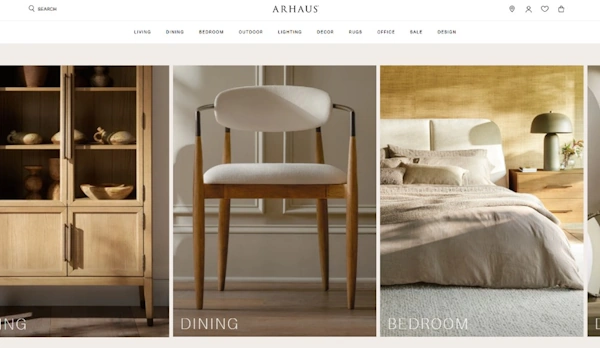
Arhaus effectively connects their imagery with their text, especially when it comes to the details about their furniture pieces and the story that they give behind each selection. For example, upon taking a closer look at their Finnley Round Dining Table, the table’s details and story provide context to what the user is seeing in the images. From the hand-finished pine sourced from Finland to the oak veneers and bluestone tops, the “Details” section of the product’s page connects the user’s mind to the high-quality images provided, creating an almost visceral sense of not just how the table looks but even how it should feel under your hands because of its described materials.

This wouldn’t be so possible without Arhaus following the best practice of using high-quality, high-resolution photographs of their dining table product. This quality of imagery offers a window for the user to truly see the product and appreciate the material details that the product page’s Detail section describes.
Visual Consistency on the Arhaus Website
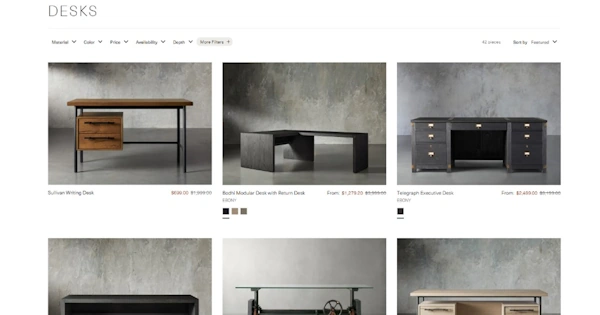
Visual consistency on the Arhaus website is achieved with the use of high-resolution pictures and backgrounds with similar tones for each picture.
For every product image, the mood and tone are consistently established as clean, professional, but also comfortable. Thanks to high-resolution images, users are also drawn to each image, and encouraged to take a closer look, which is perfect guiding user attention and influencing user behavior.
Emotional Engagement Through Inclusivity and Cohesive Narrative
Arhaus succeeds well in creating a cohesive narrative and emotionally engaging with their visitors through the imagery of their About Us page. From the very beginning, Arhaus embarks on creating a worldly narrative that it wishes to share (even leading the second paragraph section with the header of “Our Commitment to the Earth”), and it starts with talking about their Green Initiative with their artisan partners. The imagery used maintains relevance, showing the wood from mango trees that the text describes, and even the recycled materials being sifted for future use. These images in turn create emotional engagement, offering visitors to share in Arhaus’ “sense of pride in giving new life to what would otherwise be discarded”.

Arhaus continues with the next section, returning to their artisan partners and showing the diversity of people that they work with. The imagery used of people from different places, different ethnic groups, all working towards the same goal of making quality furniture, the imagery works effectively here to both support the text and reinforce the emotional engagement that had already begun earlier on the webpage.

Next, Arhaus discusses about how they bring its worldly views to the workplace, talking about their “pledge for inclusion”. The imagery again succeeds well in maintaining relevance, connecting users with the message, and evoking an emotional connection with the users by creating a sense of togetherness, hope, and the joy to be found in cooperation.
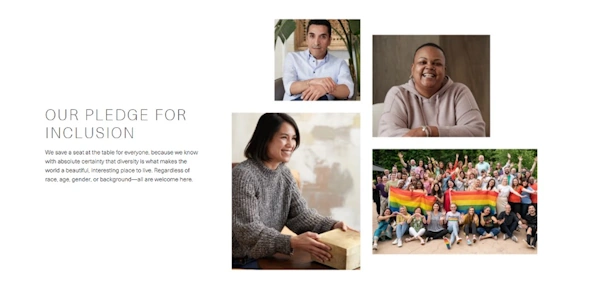
Much like how Arhaus integrated their imagery with their product pages, they knew how to create strong connections between imagery and content with their About Us page!
FAQs
What Are the Benefits of Using Stock Images Versus Custom Imagery in UX Design?
The benefits of using stock images versus custom imagery in UX design include being cost-effective, time saving since they are readily available in stock image libraries, and there is a large variety of existing stock images to choose from to meet your thematic requirements.
What Are Some Examples of Cultural Missteps in UX Imagery and How to Avoid Them?
Some examples of cultural missteps in UX imagery and how to avoid them include conducting thorough research to avoid making inappropriate assumptions, avoiding any cultural stereotypes, paying attention to historical context when portraying something, and using respectful and accurate representations of different cultural groups and their practices.
How Do Tools Like Photoshop, Sketch, and Figma Support UX Designers in Creating Imagery?
Tools like Photoshop, Sketch, and Figma support UX designers in creating imagery by offering comprehensive support in the creating, editing, and enhancing of images. Sketch and Figma are also both ideal for prototyping and they also offer collaboration features for design teams to work better together.
Revisit A Section
- What is Imagery in UX Design?
- What is the Role of Imagery in UX Design?
- Why is Imagery Important for Enhancing User Experiences?
- How Has the Use of Imagery in UX Evolved Over Time?
- The Early Days
- The 90’s
- The Web 2.0 Era
- The Rise of Mobile Devices
- Advancements in Display Technologies
- A New Personalized Emphasis on User-Centric Design
- Modern Technologies and Ethical Considerations
- Types of Imagery in UX Design
- Photograph Imagery
- Illustration Imagery
- Iconography
- Infographics Imagery
- Backgrounds
- Animations
- How Are Different Types of Imagery Chosen for Specific Projects?
- Project Goals and Objectives
- Target Audience
- Brand Identity
- Content
- Usability and Functionality
- Accessibility
- Emotional and Aesthetic Appeal
- What is the Psychological Impact of Imagery?
- How Does Imagery Affect User Emotions and Behavior?
- Emotional Engagement
- Developing Brand Trust and Credibility
- Guiding User Behavior
- Cultural Impact
- What Are the Best Practices for Selecting and Using Imagery in UX
- How Should Imagery Be Selected?
- High-Quality Images
- Maintaining Relevance in Imagery
- Visual Consistency
- Building a Cohesive Narrative
- Promoting Inclusivity
- Iterative Feedback Loop
- How Is the Impact of Imagery Measured?
- How to Evaluate the Effectiveness of Imagery in UX Design?
- A/B Testing
- Heatmaps
- User Behavior Analytics
- User Surveys
- How Can Imagery Be Effectively Integrated with UI Components?
- Background Images
- Hero Images
- Thumbnails
- Content Sections
- What Are Some Examples of Proper Use in Imagery?
- What is Arhaus?
- Effectively Connecting Imagery with Text
- Visual Consistency on the Arhaus Website
- Emotional Engagement Through Inclusivity and Cohesive Narrative
- FAQs
- What Are the Benefits of Using Stock Images Versus Custom Imagery in UX Design?
- What Are Some Examples of Cultural Missteps in UX Imagery and How to Avoid Them?
- How Do Tools Like Photoshop, Sketch, and Figma Support UX Designers in Creating Imagery?
