

Hero Images in Web Design: How Pentagram Does It Well
Estimated Reading Time: 19 Minutes
By: Jon Lee
Share


KEY
POINTS
- Hero images are meant to make a large visual impact, quickly capturing user attention and convey a brand’s message.
- Hero images can leverage their visual impact to also evoke emotions in a user to forge an emotional connection, making a website more memorable.
- Hero images can be strategically chosen to clearly communicate a brand’s core message and what they’re offering, helping users by reducing cognitive load.
Hero images in web design involve the strategic selection and deployment of large imagery at the top of a webpage to serve as a main visual focus that grabs the user’s attention quickly and conveys a brand’s message. As one of the first things that a visitor would see, the hero image needs to be filled with energy, assists in establishing visual hierarchy, and conveys the right messaging in any text that’s included in the hero image.
What Are Hero Images?
Hero images, also known as hero headers, are large pieces of imagery near the top of a webpage that are meant to grab the user’s attention and efficiently provide information about a brand. The importance of hero images makes it a key part of web design by acting as a website’s first line of engagement. When used effectively, hero images can impress users and make them more emotionally invested in a brand and its offerings from the start.
What is the Role of Hero Images in Web Design?
The role of hero images in web design revolves around aiding in the clear communication of a brand’s identity, the purpose of the website and how it serves the user, and what kinds of products or services the brand is offering. The hero image is also meant to activate the user’s curiosity to make them want to explore deeper into a website. Since the hero image is often the first thing that a user sees upon entering a website, the hero image plays a crucial role in branding and encouraging users to explore further.

What Is the Impact of Hero Images on Web Design?
The impact of hero images on web design is significant. With strategic placement, properly executed imagery, and well-constructed messaging, a hero image can improve a webpage’s aesthetic appeal, create immediate user engagement, and act as a vehicle of effective communication. Hero images can also improve navigation and usability when navigational buttons like call-to-actions (CTA) are clearly integrated into the hero image. Hero images also positively impact session duration, lead to higher conversion rates, and establishing brand personality.
Enhancing Aesthetic Appeal
Hero images enhance aesthetic appeal by making a website more attractive and engaging for all users. This can be in the form of lively images, eye-catching animations, or engaging videos to go along with any text.
Creating Immediate User Engagement
Creating immediate user engagement with hero images is about making a strong first impression with a user, helping to ensure that the user stays on the website longer to better convert.
Effective Communication
Hero images are a concise way to tell a brand’s story, offer a value proposition, and help a user understand the purpose of the website.
Improving Navigation and Usability
Improving navigation and usability can be accomplished by using hero images and the power of visual cues and prompts to guide users.
Longer Session Duration
Longer session durations become likely as a hero image does the work of capturing the user’s attention and gives them important points of information from the start.
Higher Conversion Rates
Higher conversion rates can be achieved with the help of how hero images grab the user’s attention. When CTAs are incorporated into a hero image, they should be made to guide the user’s attention and prompt action.
Establishing Brand Personality
Hero images play a significant role in establishing brand personality, from the imagery used in a hero image to the messaging conveyed.
History and Evolution of Hero Images
The history and evolution of hero images saw years of change in web design before hero images became a key part of enhancing a modern webpage’s design. From the late 2000s to today, hero images emerged and rose to becoming a staple in the design of many websites.
The Days of Early Web Design (Early 90s to Mid-2000s)
The days of early web design were a time when large images were resource heavy, making them possible but unwieldy.
The Arrival of Broadband (Mid-2000s)
The arrival of broadband was when the internet became faster, allowing users to upload and download files faster than ordinary dial-up. Flash animations rose in popularity in the mid-2000s, but they still took up a lot of bandwidth, making any sort of hero image not convenient.
The Rise of Hero Images (Late 2000s)
The rise of hero images came with the arrival of CSS and HTML5, web design had improved and large images like hero images were now possible to use without slowing the user experience down too much. Now websites were able to have the same kinds of large, full-width hero images that physical print media would use, allowing web designers to give websites a just-as-significant impact on users.
The Advancement of Mobile Devices (2010s)
The advancement of mobile devices led to a greater use of smartphones and tablet devices. This led to the need for more responsive web design, which meant hero images needing to be able to adjust and adapt to different screen sizes while still retaining their impact.

This period was also when performance optimization techniques such as lazy loading and image compression became more necessary to ensure that hero images and other large images could be used while making sure that users could still enjoy fast load times.
The Hero Images of Today (2015-Today)
The hero images of today are used in many kinds of websites including e-commerce, technology companies, medical providers, and more. Thanks to even faster internet speeds, improved browsers, and advanced camera technology, high-resolution images and video backgrounds are more popular. Hero images today are also able to incorporate a variety of interactive elements from buttons and hover effects to parallax scrolling, each providing an enhancement to the website’s design.
Data analytics for websites also allow for a more personalized hero image experience for each user, allowing brands to make an even greater impact by targeting each user based on their preferences and behaviors.
What Types of Hero Images Are Implemented in Web Design?
The types of hero images implemented in web design come in various forms such as static and dynamic hero images, video backgrounds, interactive hero images, parallax scrolling hero images, and full-screen hero images. Each type of hero image offers different kinds of benefits to a webpage’s design as well as the user experience. The type of hero image a webpage should have will depend on how a designer wants to engage with users, achieve website goals, and even work around certain challenges or limitations that they may encounter.
Static Hero Images
Static hero images are single images that do not move. Their simplicity allows them to load faster than dynamic and animated hero images, providing users with clear imagery that gets the message across. Static hero images help in maintaining a consistent aesthetic across browsers and devices, ensuring that all users are enjoying a website the same way.

Dynamic Hero Images
Dynamic hero images are images that can move and change. Dynamic hero images can include anything from an image carousel to hero images with various animated effects. Dynamic hero images are likely to be found on e-commerce sites, landing pages, and other websites where the showcasing of products or multiple pieces of content are important to a page’s success.
Video Backgrounds in Hero Images
Video backgrounds in hero images are about creating a highly engaging background that can highly important elements such as a call-to-action (CTA). Video backgrounds in hero images also serve to showcase products in action, telling an emotional story, conveying a lot of information in a concise and engaging way. It is important to consider that video backgrounds may use more bandwidth and can impact load times, but video backgrounds can be optimized for performance and have options for users with slower connection speeds.
Interactive Hero Images
Interactive hero images are hero images that utilize a variety of interactive elements such as hover effects, clickable elements, and embedded forms that users can fill. Naturally, interactive hero images encourage users to become more engaged and directly interact with the hero image. For websites looking to convert visitors into customers, having an interactive hero image can save users time from having to navigate around to learn more about a product, access a contact form, or be directed to the next part of the intended user journey.
It is important to make the interactivity as intuitive as possible for the user, and to prevent any possible user confusion. But when well-executed, a smooth and engaging user experience is made possible with interactive hero images.
Parallax Scrolling Hero Images
Parallax scrolling hero images are hero images with a background image that moves at a different speed from the foreground content whenever the user is scrolling. Parallax scrolling hero images have the advantage of adding a modern touch to a website’s aesthetic appeal and they encourage users to interact with the hero image and keep scrolling to explore more of the page’s content. This makes parallax scrolling hero images excellent for visually driven websites like portfolio sites for creatives, travel blogs, and other sites that focus on storytelling.
Parallax scrolling hero images are highly engaging, but they can also be resource intensive. Designers should also make sure that their parallax scrolling hero images do not detract from accessibility—readability and usability should be maintained for all users.
Full-Screen Hero Images
Full-screen hero images are hero images that take up an entire screen, regardless of the screen size or device that the user is using. Full-screen hero images are great for creating highly immersive experiences for users, eliminating other visual distractions, and allowing the users to focus solely on the hero image and a brand’s intended message. Full-screen hero images are likely to be found on product launch sites, landing pages, and other sites where the biggest and boldest first impression is key to a brand’s success.
How Is the Rule of Thirds Applied in Hero Images?
The rule of thirds is applied in hero images much like other kinds of images, with the intention of creating a visually appealing image that is also well-balanced. The rule of thirds involves considering an image as if it has a grid of nine equal parts using two equally spaced horizontal lines and two equally spaced vertical lines. Key elements, also called visual focal points, would be placed along these grid lines to help ensure that they draw attention. Balance must be maintained though to minimize clutter and even out the user’s focus on what is important. This is all especially important for hero images since it is the hero image’s responsibility to draw the user’s attention and focus that attention on the most important details.

What Are the Best Practices for Using Hero Images
The best practices for using hero images are aimed at enhancing user engagement, usability, navigation, and creating a memorable experience that encourages users to progress through the intended user journey and convert. The best practices for using hero images include measures such as maintaining relevance, using high-quality images, optimization for performance, clear messaging, keeping consistency, and effectively using dynamic and interactive elements in hero images.
Maintaining Relevance
Maintaining relevance is key for connecting hero images to a brand’s core message, a website’s content, and the target audience. A hero image should be made sure to reflect a brand’s identity and aesthetics to ensure a strong and consistent emotional connection with users.
High-Quality Images
High-quality images help hero images give websites a professional appearance. A high-resolution hero image is not only aesthetically pleasing, but it also serves to create a significant positive first impression.
Optimization for Performance
Optimization for performance is about ensuring fast loading times for users across different browsers and devices. Images that are used for hero images can be optimized using formats such as JPEG for photographs and PNG for other graphics. Designers can also use lazy loading for hero images to further improve load times, loading images only when they are about to appear on a user’s screen.
Clear Messaging
Clear messaging in a hero image is about ensuring readability and the use of concise messaging in text overlays. For readability, there should be enough contrast between the text and the background image to make sure that all users are able to read and digest the brand message properly.
Consistency
Consistency should always be maintained in hero images across a whole website. Part of that consistency involves maintaining a consistent style and tone for each webpage with a hero image, all to help reinforce brand identity. Consistency in hero images also ensures that the visual hierarchy of each page is easy to determine and follow.

Dynamic and Interactive Elements
Dynamic and interactive elements can be used effectively in hero images when done by a designer who knows how to use animations, transitions, and interactive features. But the designer must understand how to use these kinds of elements to enhance a webpage’s design while not overcomplicating it. To achieve this balancing act, animations and transitions should always be smooth and undistracting. Meanwhile, any interactive features placed into a hero image should be intuitive, easy for users to figure out, and provide clear feedback when the user interacts with that feature.
What Are Common Mistakes in Hero Image Implementation?
Common mistakes in hero image implementation include poor image quality, improper sizing and scaling of images, slow loading times, inappropriate choice of images, poorly made text overlays, missing CTAs, overuse of animations and effects, and lacking mobile optimization. Each of these common mistakes can lead to a hero image having a poor impact on users when they visit your site. A poorly implemented hero image can also lessen user confidence in a brand and turn visitors away before they’ve had the chance to explore your site and potentially convert.
Poor Image Quality
Poor image quality can reduce the visual appeal of a hero image and even create a sense of unprofessionalism that can turn away visitors. Traits of poor image quality include pixelation, blurriness and other forms of lack of clarity, and over-compression that leads to loss of details.
Improper Sizing and Scaling
Improper sizing and scaling refer to not using correct aspect ratios and using fixed-sized images that are incompatible with responsive design. When there is improper scaling and the aspect ratio is incorrect, hero images can look distorted such as squished or stretched out. Those images can also have important parts cropped out because of bad aspect ratios. When an image has a fixed size, it cannot respond and adjust for the differences in screen size when a user is viewing a website on a mobile device instead of a desktop computer.

Slow Loading Times
Slow loading times can occur when hero images are not optimized properly or when there is no lazy loading in place. Large hero images should be optimized to help minimize load times—the longer the loading times, the greater the chance for higher bounce rates as users become disengaged. Lazy loading helps to lessen the initial page load, making it especially important for something as large as a hero image.
Inappropriate Image Choices
Inappropriate image choices refer to hero images that have been incorrectly chosen for a brand and a brand’s website. Hero images, in general, can create a big and nice impression for users—but if the hero images are irrelevant or overly complex, those same hero images can instead confuse a user, overwhelm their ability to focus, and fail to convey a brand’s intended message.
Poor Text Overlays
Poor text overlays happen when a hero image and its text overlay have poor contrast and positioning issues. When there’s poor contrast, it can lead to readability and accessibility problems for users. Bad positioning of text overlays can also lead to obscured text as the text clashes with complex portions of a hero image. Another form of bad positioning is inconsistency in the positioning as the hero image is viewed on different devices and screen sizes.
Missing CTAs
Missing CTAs (calls-to-action) mean lost opportunities to leverage the impact of your hero image to convert a visiting user. When a CTA is absent from your hero image, it can also leave users feeling unsure of where to progress next in the intended user journey. Even with a CTA in place, it needs to be clear and properly placed—vague and unclear CTAs can be just as bad as a missing CTA when it leaves users feeling unsure of what to do next.
Overusing Animations and Effects
Overusing animations and effects in a hero image can create overly-distracting animations that can be overwhelming for users and take away from the hero image’s intended impact. Intense animations can also lead to performance issues as they become more resource heavy. Overusing animations and effects can also create accessibility issues, making it uncomfortable for those with motion sensitivity.
Lack of Mobile Optimization
Lack of mobile optimization will make hero images non-responsive when viewed on a mobile device. Non-responsive hero images lead to problems with scaling and other forms of poor visibility. A non-responsive hero image can also hinder touch interactions and overall navigation for the user. Improper mobile optimization can also create problems with inaccessible CTA buttons and unviewable text overlays, harming the effectiveness of the hero image.
What Are Some Examples of Properly Implemented Hero Images?
Some examples of properly implemented hero images include high-quality images, clean and contextually relevant images, proper use of text overlays and CTAs, mobile optimization, and image optimization for fast loading times.
One particular site that caught our attention was Pentagram, an independent design studio that has created virtually every kind of hero image that a client may want for their site.
What is Pentagram?
Pentagram is an independent design studio that spans across multiple disciplines including graphics, products and packaging, exhibitions, advertising, brand identity, and more. When it comes to hero images, Pentagram puts its best foot forward, both in the hero images it creates for its clients and how it uses those hero images on their visually driven portfolio site to vivaciously present their artful prowess.
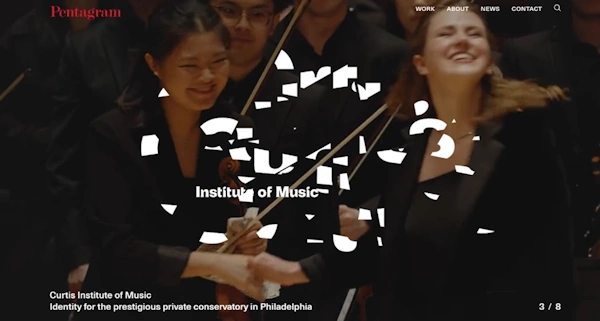
Effective Use of All Types of Hero Images
Upon first entering their website, Pentagram greets users with a dynamic full-screen hero image gallery that auto-scrolls to show off some of their works. Upon scrolling down, it’s revealed that this hero image gallery is also a parallax scrolling hero image, fading to black as it cruises upwards.
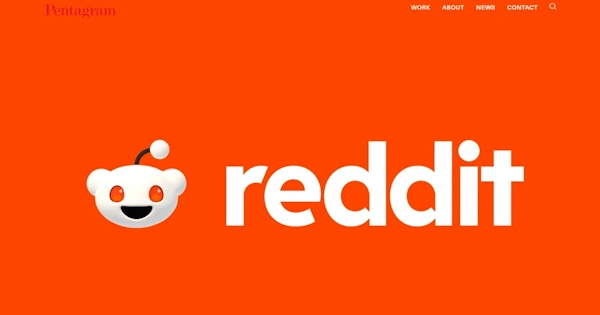
In our case, the dynamic Pentagram hero image first showed us a hero image that Pentagram had made for Reddit. Along with Reddit’s characteristic use of white and orange as their theme colors (which contrast very well), Pentagram also adds an engaging animation that draws users in, making them want to interact with the image.
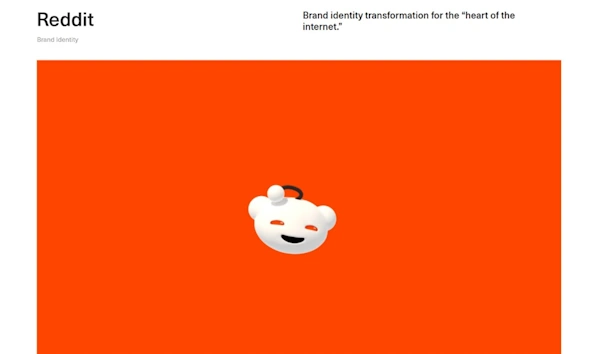
Upon clicking, users are taken to a page dedicated to Pentagram’s work for Reddit, containing not just the hero image for Reddit (also used as the hero image for this Reddit portfolio page) but also other images and videos that Pentagram has made for the brand.
Pentagram effectively uses all types of hero images in their portfolio of work, not as products for their clients, but also to enhance the look of their own website as they showcase their work. There are examples of static, dynamic, parallax, video, and full-screen hero images for Pentagram’s various clients.
Consistency in Hero Images
Consistency in Pentagram’s hero images is made clear in their different projects. For example, in their work for a brand called Phenology, which focuses on holistic menopause relief, Pentagram utilizes contrast to draw attention to the focal point of each hero image they made. In the case of two hero images they made, the focus is on the center. In the first one, the hero image is a video that transforms from a blank screen to showing a butterfly, a dark green background, and the brand name Phenology. Meanwhile, the other is a static hero image containing three women smiling with green plants of different kinds behind them.
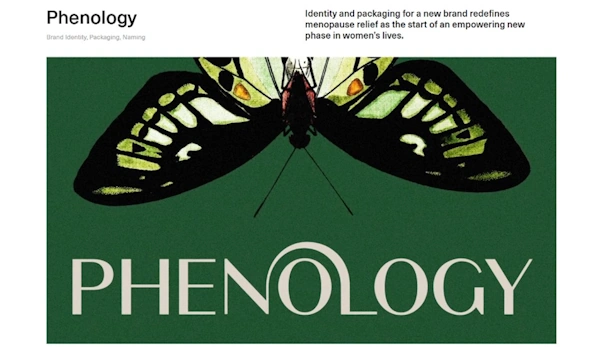

What makes these two related in terms of consistency is how Pentagram wields green and uses it to frame their subjects. Whether it’s the word Phenology being framed by a solid dark green, or the three women being framed by a motley variety of greens (with a majority still dark green), the style and the technique remains the same.
FAQs
How Do You Make Hero Images Accessible?
Hero images can be made more accessible by using descriptive alt text, ensuring that all text is highly readable with sufficient contrast between the text and the hero image’s background, implementing responsive design into a hero image, and optimizing the hero image for faster load times.
What Are Some Common Mistakes to Avoid with Hero Images?
Some common mistakes to avoid with hero images include using low-quality images, images that are irrelevant, overloading a hero image with too much clutter, failing to ensure responsive design, and not accounting for accessibility.
How Often Should Hero Images Be Updated?
Hero images should be updated regularly to keep content fresh, stay up to date with any changes in branding, stay relevant, reflect any seasonal promotions or new product launches, and to maintain engagement with users.
Revisit A Section
- What Are Hero Images?
- What is the Role of Hero Images in Web Design?
- What Is the Impact of Hero Images on Web Design?
- Enhancing Aesthetic Appeal
- Creating Immediate User Engagement
- Effective Communication
- Improving Navigation and Usability
- Longer Session Duration
- Higher Conversion Rates
- Establishing Brand Personality
- History and Evolution of Hero Images
- The Days of Early Web Design (Early 90s to Mid-2000s)
- The Arrival of Broadband (Mid-2000s)
- The Rise of Hero Images (Late 2000s)
- The Advancement of Mobile Devices (2010s)
- The Hero Images of Today (2015-Today)
- What Types of Hero Images Are Implemented in Web Design?
- Static Hero Images
- Dynamic Hero Images
- Video Backgrounds in Hero Images
- Interactive Hero Images
- Parallax Scrolling Hero Images
- Full-Screen Hero Images
- How Is the Rule of Thirds Applied in Hero Images?
- What Are the Best Practices for Using Hero Images
- Maintaining Relevance
- High-Quality Images
- Optimization for Performance
- Clear Messaging
- Consistency
- Dynamic and Interactive Elements
- What Are Common Mistakes in Hero Image Implementation?
- Poor Image Quality
- Improper Sizing and Scaling
- Slow Loading Times
- Inappropriate Image Choices
- Poor Text Overlays
- Missing CTAs
- Overusing Animations and Effects
- Lack of Mobile Optimization
- What Are Some Examples of Properly Implemented Hero Images?
- What is Pentagram?
- Effective Use of All Types of Hero Images
- Consistency in Hero Images
- FAQs
- How Do You Make Hero Images Accessible?
- What Are Some Common Mistakes to Avoid with Hero Images?
- How Often Should Hero Images Be Updated?
