

Consistency in UX Design at OnShift
Estimated Reading Time: 14 Minutes
By: Jon Lee
Share


KEY
POINTS
- Consistency in UX is about maintaining uniformity in several aspects to create a more intuitive interface for users.
- Consistency plays a role in increasing user efficiency and usability on the website or application.
- Effective integration of consistency in a website or application’s UX design allows for a streamlined development process, including in the making of future updates.
Consistency in UX design plays the crucial role of building and maintaining a user’s perception of what makes a website or application unique. But consistency also plays a role in making a website or application interface easy to navigate and quick to learn. There are multiple ways that consistency can affect UX design. For OnShift we have noticed there was special attention given to visual and functional consistency of the website. These types of consistency can help ensure that a user is able to intuitively navigate from the beginning of your website to the point of conversion, creating an easier user journey that results in a desired outcome.
What is Consistency in UX Design?
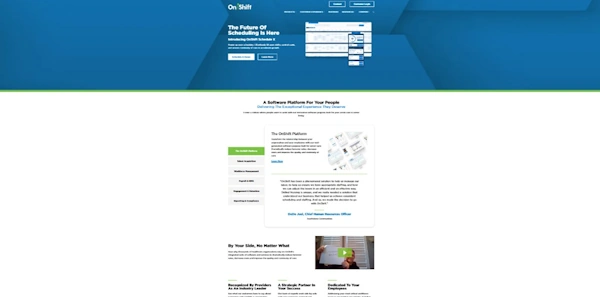
Consistency in UX design is about the maintaining of uniform elements throughout a website or application to make it easy to use and navigate. Consistency itself comes in several forms, each playing a role in creating a comprehensively consistent UX.
Why is Consistency Important in UX Design?
Consistency is important in UX design because a website or application that successfully implements consistency can expect improvements in usability, user efficiency, reinforced brand identity, and a reduction in user cognitive load. Consistency also helps enhance accessibility through predictable navigation, creating standardized patterns of interaction, and reducing the learning curve.
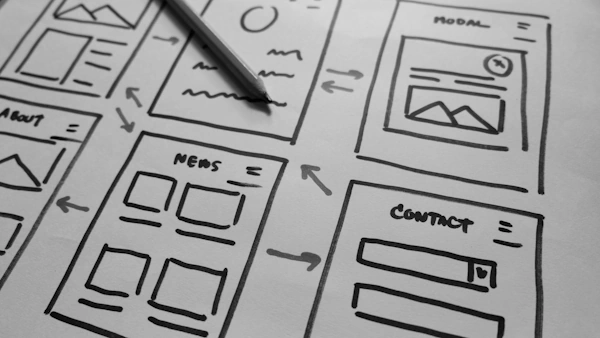
When consistency in UX design is properly integrated, the enhancements mentioned will create a more intuitive experience that increases user confidence and satisfaction. This also improves the chances of retaining your users.
What Are the Different Types of Consistency Used in UX Design?
The different types of consistency used in UX design coincide with the different kinds of elements that make up a website or application interface. The main types of consistency in UX design include visual, functional, internal, external, content, accessibility, interaction, feedback, temporal, semantic, and platform.
The different types of consistency used in UX design work together to create an intuitive interface that’s easy to remember and navigate. But different websites and applications are bound to specialize in one or a few of them. In the case of OnShift, visual and functional consistency were very noticeable on their website.

How is Visual Consistency in UX Design Achieved?
Visual consistency in UX design is achieved through the uniform application of visual elements in a website or application. This can involve maintaining consistency in color choices, fonts, icons, spacing between elements, and the general layout of each page.

Ensuring visual consistency for each of these visual items assists in the creation of a brand identity, but it also helps improve user comfort and efficiency by reducing the learning curve and making it easier to navigate.
Some examples of visual consistency in UX design include a company using a particular font or an image that becomes synonymous with their identity. Other companies may define themselves by the emotion created by their choice of color and layout, such as how an uncluttered layout that utilizes a lot of white and off-white colors may be associated with clean, sleek, and even prestigious.
What is Functional Consistency in UX Design?
Functional consistency in UX Design is about ensuring that interactive elements remain consistent in how they work. This includes elements such as buttons, links, hover effects, control elements like dropdown menus, and even navigation bars. When these elements work in a consistent and predictable way, it reduces cognitive load and increases user comfort, making it easier for them to use your website or application and return to it again.
Functional consistency in UX design enhances user efficiency and behavior predictability on websites and applications. However, UX designers can seek to balance consistency with innovation. To minimize disruption, innovative functions should be integrated incrementally, using user testing and feedback.
What is Internal Consistency in UX Design?
Internal consistency in UX design refers to maintaining consistency within a website or application. Internal consistency considers interactive components, color choice, feedback mechanisms, and even the use of specific terminology.
What is External Consistency in UX Design?
External consistency in UX design involves ensuring consistency across multiple platforms for a single brand. Some examples of external consistency in UX design include maintaining brand logos, color schemes, and typography across mobile apps, desktop experiences, and other platforms that a brand may use.

What is Content Consistency in UX Design?
Content consistency in UX design revolves around the presentation of information and keeping it uniform throughout a website or application. Some examples of content consistency include standardizing headings, text styles, and even the use of bullet points. Maintaining the same tone and terminology is also key to content consistency in UX design.
What is Interaction Consistency in UX Design?
Interaction consistency in UX design specifically refers to the interactive elements of a website or application and ensuring that they remain reliable and uniform. Examples of interaction consistency include ensuring consistent actions for certain buttons (like a Save button or a Next button), consistent feedback mechanisms like animations when something is clicked, and even designing elements that work consistently with gesture interactions on mobile devices.
What is Temporal Consistency in UX Design?
Temporal consistency in UX design is about maintaining consistency over the course of time, even when updates are being made. Updates should be made incrementally so that they don’t lead to user confusion. Temporal consistency in UX design also involves providing legacy support while new features are being slowly introduced.
What is Semantic Consistency in UX Design?
Semantic consistency in UX design involves the consistent use of naming conventions (like consistently using “Request a Demo” on every page, and not changing the wording to “Get Demo” for the same button on a different page), information architecture such as menus and content groupings, and the uniform use of headings and subheadings to aid visual hierarchy.

What is Feedback Consistency in UX Design?
Feedback consistency in UX design revolves around ensuring that a user receives the same feedback when they interact with different elements. When feedback consistency is successfully integrated, the same buttons and effects (such as hover effects or dropdown menus) across a website or application offer the same predictable response, the same auditory feedback follows the same actions. Feedback consistency in UX design can also involve tooltips and loading indicators when applicable.
What is Platform Consistency in UX Design?
Platform consistency in UX design helps ensure that a website or application interacts with different platforms in the expected ways. For example, the gesture interaction of one mobile device may be different from another, so that would need to be taken into account for the different user groups. Platform consistency in UX design can also involve following the different design guidelines set forth by those platforms such as Apple’s Human Interface Guidelines and Microsoft’s Fluent Design.
How Does Navigation Consistency Affect User Flow?
Navigation consistency affects user flow by ensuring that users can efficiently move through a website or application, giving them a higher chance of success in completing their tasks and reaching their goals with little to no interruption. In turn, this leads to better rates of user retention and greater user satisfaction. Other benefits of navigation consistency include predictability and familiarity, reduced cognitive load, and enhanced usability.
Predictability and Familiarity
Predictability and familiarity are when navigation elements are kept consistent so that users can quickly learn and become familiar with how to explore a website or application interface.
Reduced Cognitive Load
Reduced cognitive load is achieved through navigation consistency because of how a user doesn’t have to think as hard to go from point A to point B.
Enhanced Usability
Enhanced usability is made possible because of how navigation consistency makes an interface more user-friendly, accessible, and convenient to explore.
What Are the Best Practices for Consistency in UX Design?
The best practices for consistency in UX design are meant to ensure that the user experience is made as seamless and intuitive as possible. These best practices include creating a personalized design system for the designer or design team, remaining consistent with visual elements, consistent interaction patterns, using clear and consistent language for text content, designing for multiple devices, aiming to meet accessibility standards, and utilizing user feedback.
Creating a Design System
Creating a design system involves establishing a comprehensive stye guide for the designer or design team. A library of reusable UI components should also be built to ensure that different elements such as navigation and interaction are kept consistent. Maintaining a design system will allow for better collaboration, the creation of any needed documentation to keep everyone on the same page, and it creates a centralized point for any updates to design patterns that must be implemented.
Consistency with Visual Elements
Consistency with visual elements revolves around the color scheme, typography, and imagery on a website or application. Consistent color schemes help to establish brand identity, and they can help guide the user’s mood while they explore. Typography also can help set the tone of an interface while also helping to ensure readability. Imagery such as pictures can help provide additional context while icons should be kept consistent to reduce the user learning curve and boost usability.

Consistent Interaction Patterns
Consistent interaction patterns are about maintaining consistent styles with a website or application’s buttons and links. This involves the hover states, active states, and disabled states for those buttons and links. Consistent styles and behaviors should also be kept for form elements such as text fields, radio buttons, and checkboxes—clear labeling and validation messages are also helpful to include.
Clear and Consistent Language
Clear and consistent language refers to keeping the same tone and voice in the text content of a website or application. It also refers to maintaining a consistent vocabulary throughout the interface, so that the user can quickly understand different kinds of descriptions and explanations as well as microcopy such as button labels and error messages.
Designing for Multiple Devices
Designing for multiple devices involves adopting a responsive design with adaptive layouts and flexible UI components that can resize and reposition themselves based on a device’s screen size or even orientation. There should be consistency in an interface, even across different platforms, so that both features and interaction patterns remain familiar to the users of those different platforms and operating systems.

Meeting Accessibility Standards
Meeting accessibility standards such as WCAG allows for a user experience to be accessible to all users, even those with impairments and disabilities. Making all a website or application’s interactive elements accessible for keyboard navigation and screen readers is an excellent way to open the doors for a broader audience.
Utilizing User Feedback
Utilizing user feedback is crucial for the success of any website or application as it helps guide the designer or design team in meeting user needs and expectations. Ways to gather this user information include performing user research like usability testing and getting direct feedback through methods such as user surveys.
What Are Common Mistakes When Trying to Achieve Consistency in UX Design?
Common mistakes that occur when trying to achieve consistency in UX design include being over-focused on uniformity, ignoring user context, neglecting functional consistency, overcomplicating design systems, inconsistent implementation across different platforms, ignoring user feedback, and neglecting regular updates and maintenance.
Over-Focusing on Uniformity
Over-focusing on uniformity is taking consistency to the extreme, which results in the creation of a rigid and inflexible user experience
Ignoring User Context
Ignoring user context refers to focusing on consistency without accounting for different potential user scenarios and user needs.
Neglecting Functional Consistency
Neglecting functional consistency such as interactions and navigation can lead to users having a hard time exploring and interacting with an interface.
Overcomplicating Design Systems
Overcomplicating design systems and style guides can potentially confuse a design team and lead to inconsistencies instead of helping maintain consistency.
Inconsistent Design Implementation Across Different Platforms
Inconsistent design implementation across different platforms leads to inconsistent user experience and an incoherent and unpredictable design.
Ignoring User Feedback
Ignoring user feedback will not only lead to design decisions that don’t match user expectations and needs, but it will also lead to user dissatisfaction and lowered brand reputation.
Neglecting Regular Updates and Maintenance
Neglecting regular updates and maintenance can lead to design elements becoming outdated as design trends evolve and technology advances.
What Are Some Examples of Proper Consistency in UX Design?
Some examples of proper consistency in UX design include the use of a consistent set of design guidelines, maintaining consistent design across multiple platforms, and ensuring visual and interaction consistency to create a recognizable look and feel for a certain brand’s products.
One such brand that does an excellent job at maintaining visual and functional consistency on their website is OnShift!
Who is OnShift?
OnShift is a company that offers workforce management software with a special emphasis on the healthcare sector. Their platform is meant to help users manage hiring, scheduling and schedule automation, and payroll all in one place.
But even though OnShift is focused on offering a workforce management platform to its customers, it also succeeds in providing a website that maintains a solid consistency in its visuals and functions.
Visual Consistency on OnShift
Visual consistency on OnShift is achieved in several ways that continue throughout their site. Upon first entering their homepage, the first noticeable thing is their color scheme. Their name and logo include the colors blue, green, and white, and upon scrolling down their homepage, it’s quickly noticeable that they maintain this color scheme consistently.

The layout is fairly consistent as well, often with sections where text is aligned to one side and an image or video is aligned on the other side. The “Products” and “Customer Experience” pages (under their respective dropdown menus in the header nav) reveal the same consistent layout with text and images alternating in alignment. Even the About Us page follows the same, consistent layout.

There are a few exceptions that stand out such as the homepage having an interactive menu that leads users to most of the same pages in the “Products” dropdown menu.
In the pages under the “Products” and “Customer Experience” dropdown menus, they maintain a consistent layout until they reach closer to the bottom where there is a consistent call-to-action containing a “Request Demo” button, but there may be a “Top Resources” gallery with links to downloads or a three-panel “OnShift Blog” gallery. But even these elements show up on enough pages that the user will quickly expect there to be some sort of section for additional resources near the bottom.

Functional Consistency on OnShift
Functional consistency on OnShift is maintained through the consistent behavior and placement of interactive buttons as well as control elements such as dropdown menus.
The most notable and consistent buttons that we found were the “Request a Demo” and “Learn/Read/Hear More” buttons. The “Request a Demo” button takes users to the same page where they can fill in a form to schedule a demo.
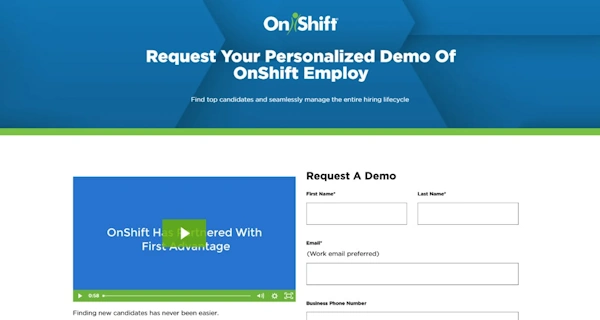
Meanwhile, the “Learn More”, “Read More”, and “Hear More” buttons clearly state their function and are placed in the alternating text-image sections to provide context as to what kind of information they would reveal to the user.
The dropdown menus remain in the header nav no matter where you go on the website, providing the user an easy, consistent, and reliable way to quickly navigate to important parts of the site.
FAQs
How Does Consistent Branding Affect User Perception and Trust?
Consistent branding affects user perception and trust by building familiarity, creating a predictable user experience, and crafting a clear identity for the user to remember. Many companies that have performed successful branding have done so with world-recognized logos, color schemes, and catchphrases with consistent typography.
What Are the Challenges in Maintaining Consistency?
The challenges in maintaining consistency can include the issues of crafting cross-platform experiences, lack of style guides, and the challenge of innovation versus consistency. Cross-platform experiences can be bridged with the aid of using adaptive layouts and responsive design.
What Are the Future Trends and Evolving Standards in UX Consistency?
Future trends and evolving standards in UX consistency include the leveraging of new technologies such as AI, machine learning, and voice-based interfaces. Standards are also evolving, such as with GDPR compliance and the use of cookie consent banners.
What Prototyping Tools are Best for Ensuring UX Consistency?
The prototyping tools best for ensuring UX consistency include tools like Figma, Sketch, Adobe XD, InVision Studio, and Axure RP. These tools have different strengths such as high-fidelity prototyping, advanced animation capabilities, integration with other tools, component libraries, and the ability for real-time collaboration sessions.
Revisit A Section
- What is Consistency in UX Design?
- Why is Consistency Important in UX Design?
- What Are the Different Types of Consistency Used in UX Design?
- How is Visual Consistency in UX Design Achieved?
- What is Functional Consistency in UX Design?
- What is Internal Consistency in UX Design?
- What is External Consistency in UX Design?
- What is Content Consistency in UX Design?
- What is Interaction Consistency in UX Design?
- What is Temporal Consistency in UX Design?
- What is Semantic Consistency in UX Design?
- What is Feedback Consistency in UX Design?
- What is Platform Consistency in UX Design?
- How Does Navigation Consistency Affect User Flow?
- Predictability and Familiarity
- Reduced Cognitive Load
- Enhanced Usability
- What Are the Best Practices for Consistency in UX Design?
- Creating a Design System
- Consistency with Visual Elements
- Consistent Interaction Patterns
- Clear and Consistent Language
- Designing for Multiple Devices
- Meeting Accessibility Standards
- Utilizing User Feedback
- What Are Common Mistakes When Trying to Achieve Consistency in UX Design?
- Over-Focusing on Uniformity
- Ignoring User Context
- Neglecting Functional Consistency
- Overcomplicating Design Systems
- Inconsistent Design Implementation Across Different Platforms
- Ignoring User Feedback
- Neglecting Regular Updates and Maintenance
- What Are Some Examples of Proper Consistency in UX Design?
- Who is OnShift?
- Visual Consistency on OnShift
- Functional Consistency on OnShift
- FAQs
- How Does Consistent Branding Affect User Perception and Trust?
- What Are the Challenges in Maintaining Consistency?
- What Are the Future Trends and Evolving Standards in UX Consistency?
- What Prototyping Tools are Best for Ensuring UX Consistency?
