

Animations in Web Design: How Pierre’s Ice Cream Does It Well
Estimated Reading Time: 16 Minutes
By: Jon Lee
Share


KEY
POINTS
- Animations provide users with immediate and clear feedback when interactions are made with a website.
- Animations can make interactions more intuitive, providing users with transitions that make navigation easier.
- Animations help establish visual hierarchy, drawing user attention to important elements, ensuring that the user stays on the intended user journey.
Animations have played a vital role on websites for many years, going beyond just refining a website’s aesthetic appeal and having a direct hand in enhancing user engagement, improving usability, and guiding users.
What Are Animations in Web Design?
Animations in web design are a powerful element in web design because of how they can turn an ordinary website into a dynamic, engaging, and user-friendly experience for users. Animations encompass the visual effects and motion that you see while exploring a website and interacting with it. The importance of animation cannot be understated as they also play a role in guiding users down the intended user journey and can make the difference between a website visitor and a successful conversion.
Why Use Animations in Web Design?
Using animations in web design offers many benefits that extend to both the brand and the website’s visitors. Without animations, a website may seem more plain and not as attractive to visitors. For the users who visit the website, animations can serve to enhance and improve the user experience, turning any website into an engaging user journey. For brands, animations can serve to effectively establish the brand’s identity and personality.
How Do Animations Improve the User Experience?
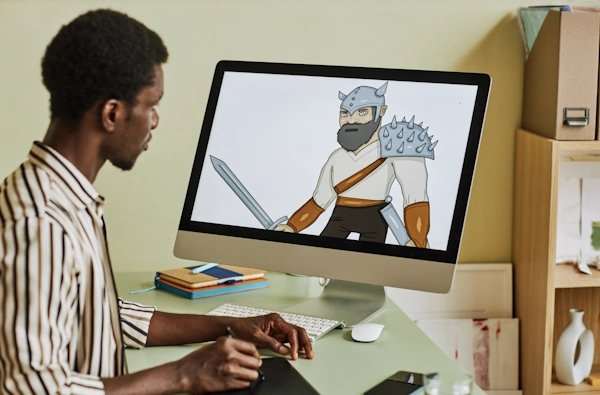
Animations improve the user experience by serving to entertain, attract, and tell a story to the user. Animations also help the user quickly learn about a brand, what that brand offers, and who that brand is trying to be. Some of these ways include better user engagement, usability, storytelling, brand personality, accessibility, and retention.
User Engagement
User engagement is improved because of how animations can grab the user’s attention, improve a website’s general visual appeal, provide feedback, and guide a user to navigate a website as intended.
Usability
Usability improves when animations are used in creating smooth transitions as a user interacts and navigates across a website. Animations, such as loading indicators, can help reduce cognitive load by making website exploration more seamless.
Storytelling
Animations enhance storytelling by adding visual appeal and dynamic motion to content or by providing a completely animated sequence. Animated storytelling can also aid in building an emotional connection between the user and the brand.
Brand Personality
Brand personality can be defined with the aid of animations and what those animations convey, helping a user to quickly understand if a brand is approachable, trustworthy, and worth their investment.
User Retention
User retention improves as animations encourage users to remain on websites longer to interact with more features and explore more webpages.
Accessibility
Animation enhances accessibility by providing useful cues and indicators for users with disabilities. Animations can provide visual alerts whenever a change occurs on the webpage.
History and Evolution of Web Animations
The history and evolution of web animations has changed much since the first GIFs and Flash animations appeared on the early web. From the rise of Javascript and CSS to the impact that mobile devices have had on animation’s role in interactive storytelling, animation continues to captivate users in many ways.
The Early Years (1990s to Early 2000s)
Animation first appeared on websites in the form of GIFs, which provided basic looping animations to give a website some added visual appeal. It wouldn’t be until Flash animation appeared that animations became more complex and even interactive. Flash animation was then leveraged to create everything from animated banners on webpages to actual games played on a web browser, offering a visually rich user experience like never before.
The Emergence of JavaScript (Mid-2000s to Early 2010s)
The emergence of JavaScript libraries enabled individuals to create animations without the use of Flash. JavaScript offered better performance, was easier to edit, and was more flexible. Then came HTML5, which further drew animations away from Flash.

The Modern Age of HTML5, CSS3, and SVG Animations
The modern age of HTML5, CSS3, and SVG animations saw Adobe announcing the end of its support for Flash. JavaScript continues to be used to this day, while advancements in animation through HTML5, CSS3, and SVG allow for more powerful animations while remaining lightweight in their impact to website performance. The modern age of web animations has also seen the rise of 3D graphics and what’s known as parallax scrolling, offering brand websites more ways to engage and captivate users. Mobile-friendly animations have also taken centerstage as the proliferation of smart devices continues to spread across the globe.
What Types of Animations Are Commonly Used in Web Design?
The types of animations commonly used in web design today are divided mainly between CSS, JavaScript, SVG, and GIFs. Whether it’s a high-quality animation that’s telling a brand’s story or a spinning loader that appears near your mouse to provide you with interaction feedback, one of these types of animation is at play behind the scenes. Each of these offers their own benefits, their own strengths, and contribute to the vibrant websites that we see today.
CSS Animations
CSS animations provide web designers with the power to create engaging and interactive websites with greater ease and without taxing performance. CSS is known for its ease of use, its capabilities in keyframe animations and transition animations, transform capabilities, and its simplicity for not needing JavaScript.
Common CSS animations include loading animations like spinners and the three loading dots, scrolling text, rotating and transforming shapes, animated submit buttons, and button wiggles. Whether as an animated object to decorate a webpage or as a form of feedback for when a user interacts with an interactive element, CSS offers many ways for web designers to create a more engaging experience for their users.
JavaScript Animations
JavaScript animations revolve around the use of JavaScript to gradually change the styles and properties of an element over the course of time managed by a timer. With the use of a timer, the gradual changes to an element are strung together into what looks like a continuous animation. JavaScript offers a lot of control and performance, allowing it to perform more complex animations compared to CSS.
JavaScript can also be used to create interactive elements, triggering animations upon different forms of interaction such as clicks and scrolling. There are many libraries that can be used to create complex JavaScript animations today.
SVG Animations
SVG animations leverages SVG (scalable vector graphics) to create high-quality graphics that are capable of scaling without losing their clarity and detail. This scalability makes SVG animations excellent for responsive web design and device displays that have a high-resolution. SVG animations are also ideal for user interactions including hover effects, user clicks, and mouse movements.
Other common uses for SVG animations include animated logos, interactive icons that provide animated feedback to users, animating data points on infographics for an interactive experience, animated buttons, animated loader graphics like spinners. SVG animations have also been used for animated storytelling such as educational content videos. SVG animation also can integrate with CSS and JavaScript, making it incredibly flexible.
GIFs
GIFs can serve to greatly enhance a website’s visual appeal and interactivity. GIF is a bitmap image format that provides support for both static images as well as the looping animated images that are popularly used today. GIFs can be created using tools or online platforms.
Online sites like Giphy are frequently used to create new GIFs for use on the web and in social media. The highly shareable nature of GIFs makes them popular for social media campaigns and for regular social media posts. GIFs can be used to attract attention, provide context to content, build brand personality, and even tell a story in a quick and easy-to-digest way.
What Are Best Practices for Implementing Animations in Web Design
The best practices for implementing animations in web design involve the thorough consideration of several factors including performance optimization, user experience, accessibility, consistency, testing, and gathering feedback. Meeting these requirements will help ensure that your animations work hard to build up your brand while remaining laser-focused on making the user experience something worth remembering.
Performance Optimization
Performance optimization for animations revolves around several best practices of its own. Prioritize and animate what elements NEED to be animated—too many animated elements can be overwhelming to the user and slow webpage loading times.
Animation complexity should be kept down to help minimize computational load—one way is to reduce the number of keyframes in the animation. Try to aim for an FPS of 60—animations at 60 frames per second will look and perform smoothly.
Accessibility
Accessibility regarding animation mainly revolves around ensuring that animations do not interfere with the experience for users who have disabilities, visual impairments, or motion sensitivities. Best practices for accessibility in animation include making animations move in a gentle and subtle way that doesn’t distract, overwhelm, or trigger a user.
Another best practice is to offer a toggle for users to turn animations on or off. When animations are being used for transitions, be careful to ensure that focus is managed properly so that users can follow the animation and content without trouble.
User Experience
User experience can be improved with animations when used to enhance usability and provide guidance and engagement. Animations can boost usability by establishing visual hierarchy and guide users to important elements that will help them complete their tasks. Animations can also improve usability by providing visual feedback as users explore the website and interact with buttons.

Consistency
Consistency in animation should be maintained to both establish brand identity as well as create predictability for user-friendliness. Animations should maintain consistency in both style and tone across a website—this will help cement a brand’s intended image or personality within a user’s mind. Those consistent animations will also help make a website’s interface more intuitive and predictable for the user.
Testing
Testing in animation allows for a web designer to catch bugs, identity performance issues, and detect accessibility problems. When done regularly, testing can ensure that a website remains optimal and meets the needs of the users. Popular forms of testing include performance testing and A/B testing. Usability testing should be done to see how users are interacting with a website’s animations to ensure that the animations are enhancing the user experience and not hindering it.
Gathering Feedback
Gathering feedback is a key method to understanding not just user sentiment about a website, but also to learn what problems need addressing, including any animation problems. User surveys provide designers with direct feedback regarding a website’s animations.
Meanwhile, analytics tools can provide data on user interactions with animation elements and help spot pain points as they arise. By gathering feedback through these methods, iterative improvements can be made to improve a website’s animations and ensure that they remain user-friendly and engaging.
What Are Common Mistakes in Animation?
Common mistakes in animation include overusing animations, being inconsistent in the style of animations, neglecting user accessibility, locking out user control, poor performance optimization, bad animation timing, and ignoring user feedback. When these common mistakes occur, the quality of a website’s animations can suffer, lose effectiveness, and even turn away users who could’ve become conversions to a brand.
Overusing Animations
Overusing animations can lead to overwhelming a user and distracting them from a website’s core content and the next steps in the intended user journey. This also leads to a reduction in the website’s usability, greater user frustration, and the website’s overall performance will suffer as loading times increase.
Inconsistency in Animation Style
Inconsistency in animation style can lead to a disjointed user experience and a lack of brand coherence. It can be uncomfortable and confusing to users as they explore a website when they encounter animations of varying styles, creating unpredictability in how to interact with the website. This resulting unpredictability can also lead to a degradation of user trust in a brand.
Poor Performance Optimization
Poor performance optimization can cause problems such as high resource consumption, poor frame rates, heavy file sizes and long loading times, poor performance for the rest of the webpage, and stuttering animations. Poor code optimization for animations can also play a role in reducing performance.
Neglecting User Accessibility
Neglecting user accessibility can lead to users being unable to use and explore a website, which can also lead to a negative impact on a brand’s image and reputation. There may be users with motion sensitivity issues, visual impairments, and other disabilities that need to be accounted for when putting animations into a website.
By neglecting inclusive design such as having the option for reduced motion, these users will be unable to enjoy a website as the animations become a barrier to their experience instead of an enhancement.
Locking Out User Control
Locking out user control occurs when a website has forced animations that automatically play without user consent. For users with sensory sensitivities and disabilities, this can be distracting and uncomfortably intrusive. Users should have the ability to pause or stop animations if they should find them distracting or triggering.
Bad Animation Timing
Bad animation timing can take the form of inconsistent speeds and poor use of easing functions. When these common mistakes happen, the user experience can become jarring and poorly constructed. Instead of being immersive, animations with bad timing can become what disrupts the user experience and potentially throws them off the intended user journey.
Ignoring User Feedback
Ignoring user feedback can manifest in the form of not testing animations with real users and failing to gather and act on direct feedback from users such as from surveys. When user feedback is ignored, the users will eventually notice as the animation problems persist. This can negatively impact a brand’s reputation and turn users away.

What Are Some Examples of Effective Animations in Web Design?
Some examples of effective animations in web design include the use of loading animations, hover effects, page transitions, microinteractions, background animations, and parallax scrolling. When used in a balanced manner, each of these effective animations can draw the user’s attention, provide them feedback, and keep them engaged on every step of their user journey.
What is Pierre’s Ice Cream Company?
Pierre’s Ice Cream Company is a Cleveland-based company that specializes in creating a broad variety of delicious ice cream treats. Today it remains in the city of Cleveland with its own fleet of specialized trucks for distribution and it maintains an SQF Level 3 Certification, which means it has earned the industry’s highest level of food safety and food quality. Customers today enjoy over 235 different products from Pierre’s and the company continues to develop new products and flavors to meet their customer’s needs.
Much like how they’ve developed their delicious ice cream, the Pierre’s website has been solidly developed using animations to entice, engage, and guide their visiting users to learn more about their company and their sweet treats.
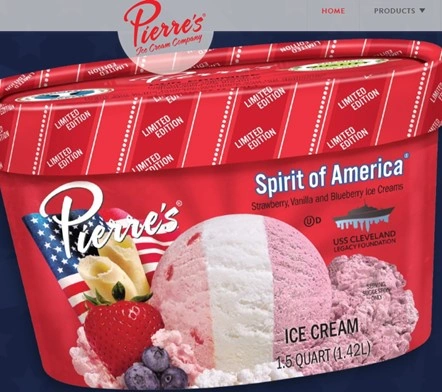
Entering the Site: An Animated Greeting and Home Page
The first thing that greets you is a page transition animation when you enter the Pierre’s site. The user first sees the Pierre’s logo, sitting in the center of the screen. From the logo, the Pierre’s signature red color spreads out in an expanding circle from the logo, beckoning the user to become immersed as they’re smoothly transported to the home page.

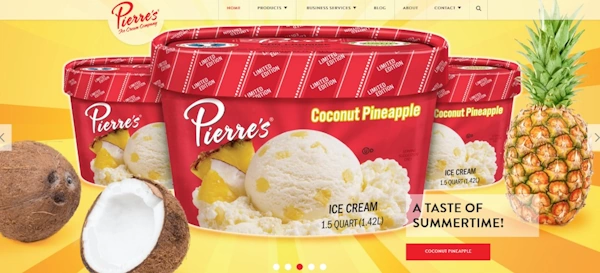
Once on the home page itself, there is a hero banner that showcases a colorful image carousel of Pierre’s different featured products. Each image is full of color that is lively but well-contrasted to ensure high visibility. On each hero image, animation is used to smoothly fade in a CTA button. Those CTA buttons are also animated, smoothly transitioning the background of the button from the signature red to white as a hover effect. This hover effect helps to encourage the user to interact with the button, which takes them further into the site to better explore the displayed product or product line.
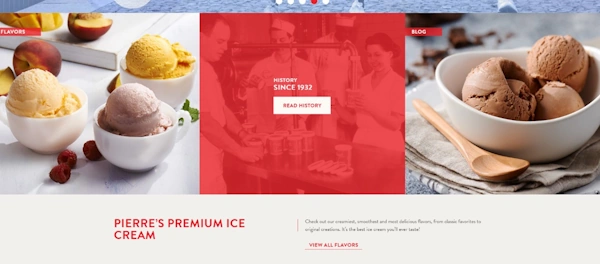
Subtle and Smooth Animations Guide the User
Further down the home page, other interactive elements, such as a link to their company’s history, are enriched with hover effect animations. What Pierre’s excels at here is the use of subtlety and smoothness in their animations. This ensures that the hover effect animations are non-disruptive to the user, they’re the right speed so that it grabs user attention without overstaying, and it also serves to guide the user. For example, when the mouse hovers over the company’s history link, the panel turns Pierre’s red, which then brings into focus the CTA button, encouraging the user to zero in and click on the button.
The practice of subtle and smooth animations carries over to the website’s other pages. For example, in the “Restaurants & Food Service” page, the different product images smoothly and just subtly expand as a hover effect. This provides the user, again, with a clear indication that their mouse has encountered an interactive element and that they are encouraged to click.
Consistency in Animations
Pierre’s maintains their animations in a very consistent manner. Interactive images like ice cream products expand to indicate interactivity while CTA buttons and large images become highlighted in the Pierre’s red color as part of a hover effect to also draw user attention and prompt interaction.

FAQs
Why Should You Use Animations in Web Design?
You should use animations in web design because of how they can greatly impact user engagement, ease of navigation, brand storytelling, establish visual hierarchy and guide users, and provide visual feedback to enhance usability.
What Are Microinteractions in Animation?
Microinteractions is a term for small and subtle animations that are used to provide users with visual feedback. This can include providing visual feedback for hover effects, user clicks, form submissions, and more.
How Can You Test Animations for Performance?
When testing animations, you should measure their impact on a webpage by their frame rates, animation duration, webpage loading times, and responsiveness to input. Testing across different browsers and devices is also recommended to get a clearer picture of the performance of a website’s animations.
Revisit A Section
- What Are Animations in Web Design?
- Why Use Animations in Web Design?
- How Do Animations Improve the User Experience?
- User Engagement
- Usability
- Storytelling
- Brand Personality
- User Retention
- Accessibility
- History and Evolution of Web Animations
- The Early Years (1990s to Early 2000s)
- The Emergence of JavaScript (Mid-2000s to Early 2010s)
- The Modern Age of HTML5, CSS3, and SVG Animations
- What Types of Animations Are Commonly Used in Web Design?
- CSS Animations
- JavaScript Animations
- SVG Animations
- GIFs
- What Are Best Practices for Implementing Animations in Web Design
- Performance Optimization
- Accessibility
- User Experience
- Consistency
- Testing
- Gathering Feedback
- What Are Common Mistakes in Animation?
- Overusing Animations
- Inconsistency in Animation Style
- Poor Performance Optimization
- Neglecting User Accessibility
- Locking Out User Control
- Bad Animation Timing
- Ignoring User Feedback
- What Are Some Examples of Effective Animations in Web Design?
- What is Pierre’s Ice Cream Company?
- Entering the Site: An Animated Greeting and Home Page
- Subtle and Smooth Animations Guide the User
- Consistency in Animations
- FAQs
- Why Should You Use Animations in Web Design?
- What Are Microinteractions in Animation?
- How Can You Test Animations for Performance?
